Design systems for coding agents: The design decisions are still yours
I gave one AI agent the same brief again and again: with no design system, on shadcn/ui, and on a product whose look had been decided before the first screen. Then I measured every element it shipped. The first pass turned out to be the easy part. What a system is for now starts after it.
I have built a design system for every product I have worked on, and over 14 years that is dozens of products. The early ones were Figma libraries and pages of documentation for people. The recent ones live in code, and I implement the components in Storybook myself, because the designer who writes the components is the first to see every gap in the system.
Now agents write a lot of the interface. Founders ask me a fair question. If Claude Code or Cursor builds a screen in minutes, and shadcn/ui gives everyone a component library for free, what is a design system still for? I wanted to answer with numbers instead of an opinion, so I ran two tests.
The setup
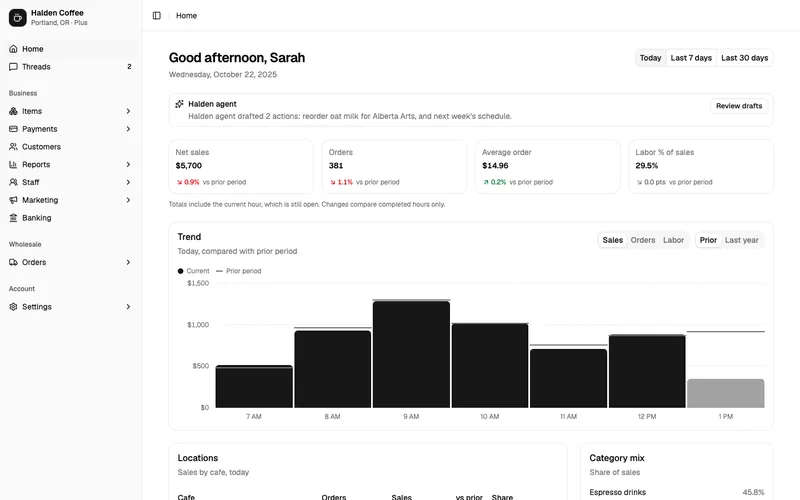
The product is Halden, a dashboard for a coffee roaster in Portland with six cafes and a wholesale line. I made it as a test bed for a review tool: an agent built it in one evening on a visual direction I set first, a token file and a small kit, with no design system behind it. The tool and that evening are in A canvas for reviewing AI-built UI.
The agent had six screens to build: the home dashboard, a list of transactions, a customer record, the business settings form, a new wholesale order, and an order with its timeline. Every build got the same written brief, the same data and the same model, Claude Sonnet, in one pass. None of them saw a screenshot of Halden or a line of its CSS.
- No system, twice. React and Tailwind, no component library, no tokens. What a founder gets from Cursor or Claude Code with a prompt.
- shadcn/ui, twice. A fresh shadcn setup with its default theme, the stack Lovable starts from.
- Halden. The same six screens from the product whose look I decided first. It was built in one evening as a test bed for a review tool, and deliberately without a design system: no rules for states, no component descriptions, no checks. A look, and nothing behind it. I took the version before any review fixes.
For every screen a script opened the page in headless Chrome at 1440 pixels and read the computed style of every element: how many different buttons and fields there are, which values fall outside the build’s own scale, which looks appear only once. Then it changed the main color, the corner radius and the density in one place, and counted what followed.
What the numbers say
Less than I expected. On the first pass every build came out reasonably consistent.
| Across six screens | No system (2 runs) | shadcn/ui (2 runs) | Halden (a decided look, no system) |
|---|---|---|---|
| Different button looks | 9 / 8 | 13 / 12 | 12 |
| Different field looks | 2 / 3 | 4 / 3 | 4 |
| Looks used only once | 15 / 17 | 17 / 15 | 16 |
| Values off the build’s own scale | 7 / 10 | 6 / 6 | 21 |
| Raw Tailwind colors around the theme | no theme | 34 / 24 | no Tailwind |
| Main color change followed | 100% / 100% | 100% / 100% | 100% |
| Radius change followed | 100% / 76% | 100% / 100% | 79% |
| Every button has a disabled look | no / no | yes / yes | no |
| Time to build | 6.5 / 9.0 min | 6.0 / 5.7 min | one evening, with the kit |
The builds with no system did not stay without one. Before the first screen, both agents wrote their own small block of tokens and a file of buttons, fields and cards. Tailwind v4 hands them variables for spacing and radius out of the box, so even these builds changed density in one place.
shadcn/ui shipped the most complete states: every button had a disabled look and a loading state. Halden lost on exactly the things a system is for. Five button heights, 21 values off its scale, no disabled look, the browser’s default focus ring. That is what a look without a system produces, and it is the point of this article: decisions give a product its face, and a system is what keeps that face consistent and complete.
So the first pass is no longer where a product goes wrong. An agent on a modern stack gets the basics close enough by itself.
What the numbers miss
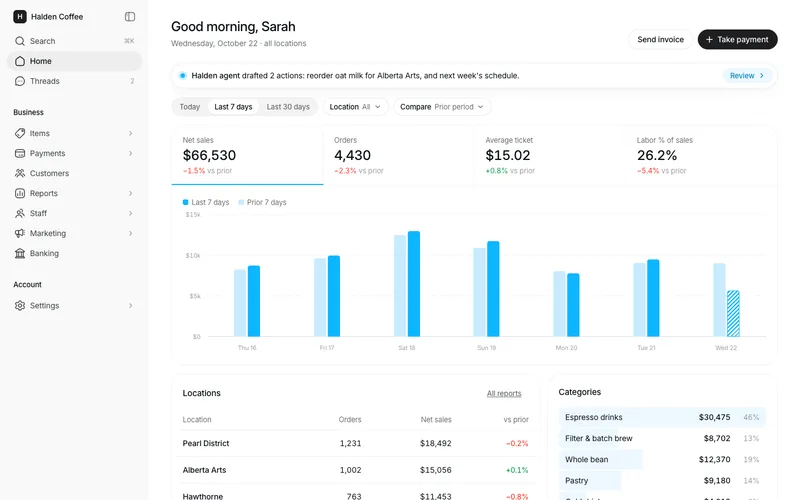
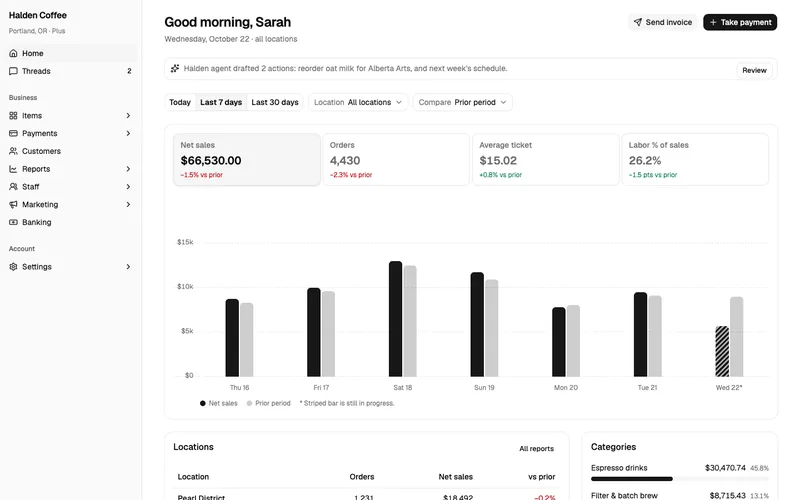
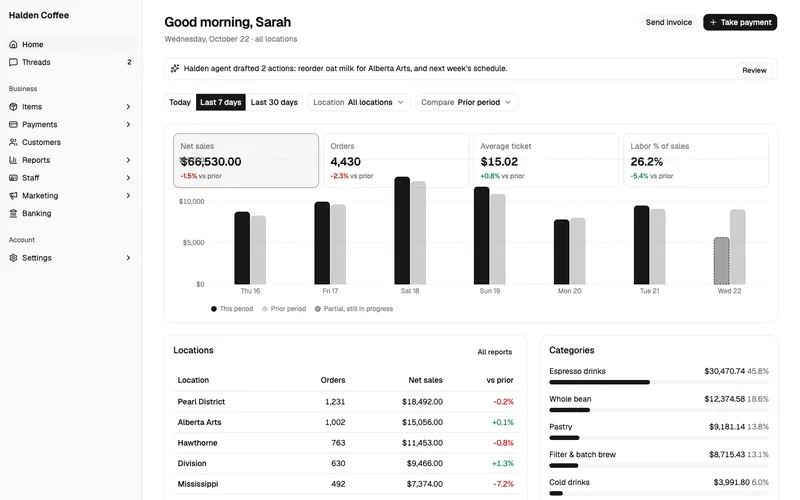
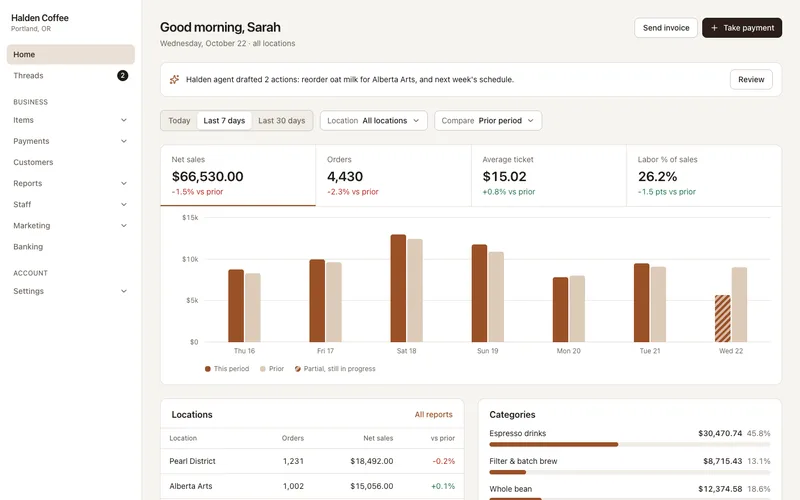
Put the screens next to each other and the measurements stop being the interesting part. The two shadcn/ui builds are the same product twice: the same grey, the same black bars, the same weight on every card. Any other company that ships the default theme gets this face too, because nobody decided anything about it.
The build with no system picked a brown “coffee” palette on its own. That is a choice, and the agent made it, not the company.
Halden has a look because someone decided it. One blue accent, used only where it carries meaning. A quiet grey for everything else. Density set for a manager who checks numbers between two cafes. None of that comes in a component library. It is a set of decisions, and tokens are the way those decisions get written down so that an agent can follow them.
Where the default theme had no decision, the agents filled the gap themselves. shadcn’s theme has no color for success or warning, so both shadcn builds styled their statuses with raw Tailwind colors: 34 classes in one, 24 in the other, all out of reach of the next theme change.
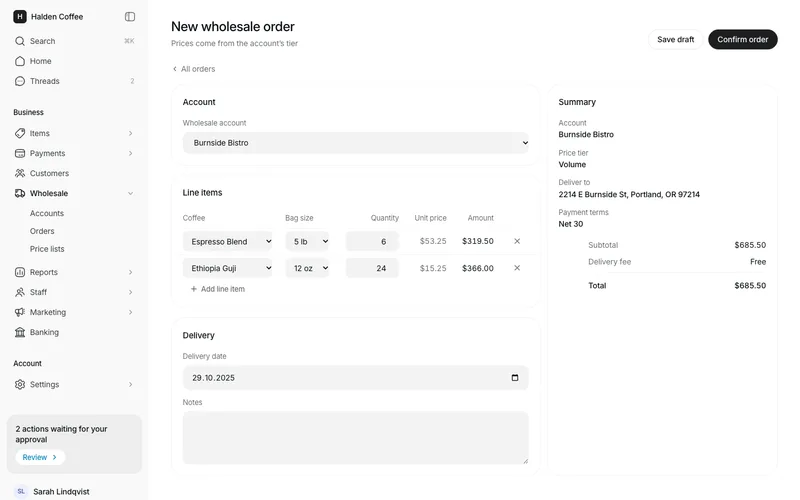
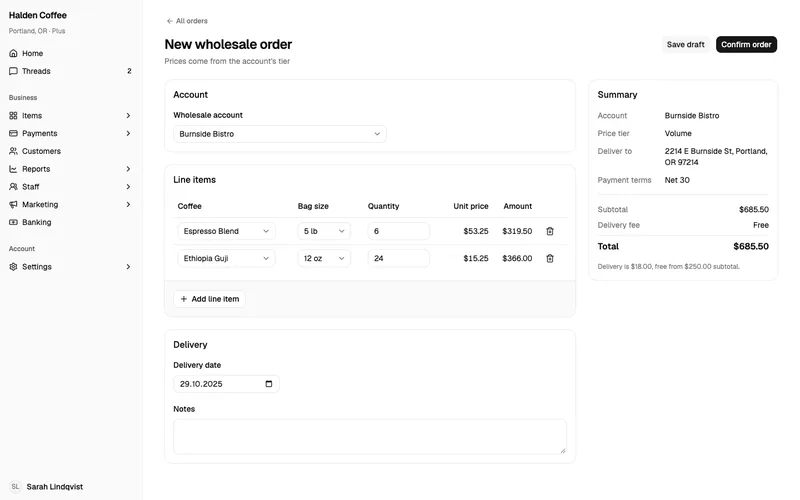
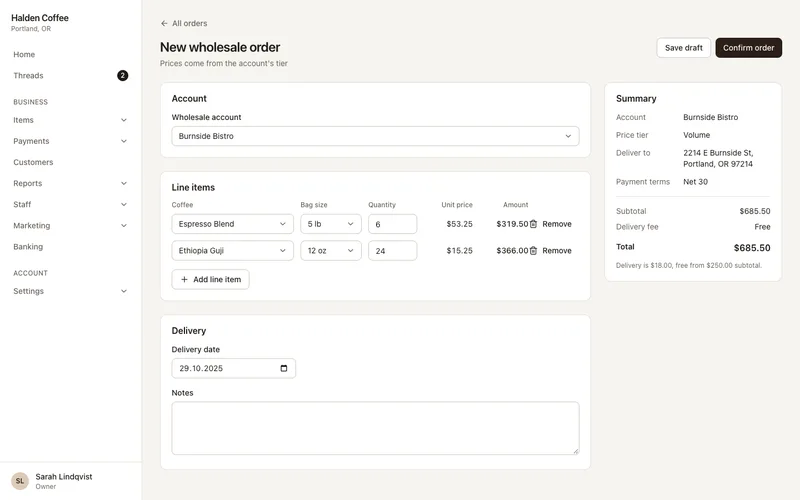
A short brief builds a different product every time
I ran a control. The same four stacks got a one-paragraph brief, the way founders often write one: six screens and their addresses, the data file, and “make it look good”.
The screens looked fine. The agents chose palettes, added cards nobody asked for, and one rewrote the shadcn theme to match a brand it imagined. But a third of the concrete decisions disappeared: of 79 items in the detailed brief, the builds kept between 43 and 50. No build had a loading or an error state. Two runs of the same stack disagreed about the product itself, bars against a line, today against the last seven days, different cards on the dashboard. Looks used only once rose to between 23 and 29 in three of the four builds.
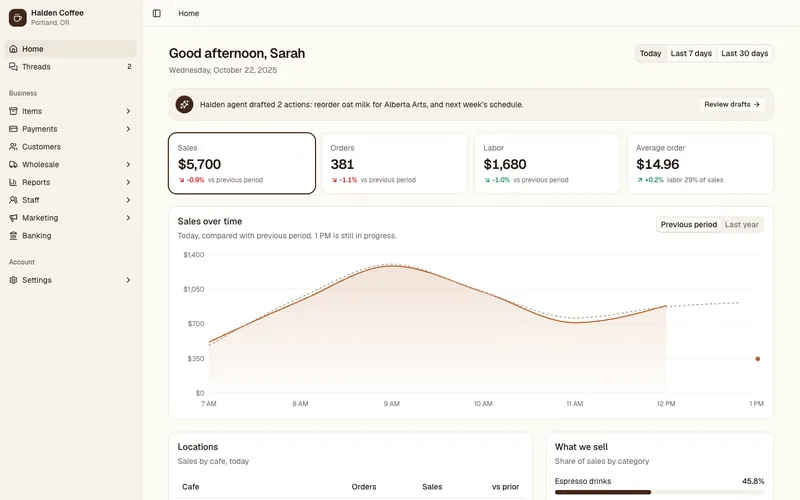
That is the part an agent does not invent: the decisions. The detailed brief did not make the screens prettier. It made them complete, and the same twice. A design system is that brief, written once, for every screen the product will ever have.
Where drift starts: the second screen, and the fiftieth
The first test I ran was about growth. Three agents added the same six-screen wholesale section to Halden, which already had its token file and component kit in the code. One got only the brief. One also got written guidelines, the kind of page a team keeps in Notion. One got the system in a form an agent reads: a rules file, a catalog that says what each component is for and when not to use it, and an audit it had to run until it reported nothing.
On screen, the three sections looked almost the same. The agents copied the existing screens, mistakes included: two of them took a hard-coded field height from Halden’s settings form straight into their new code. The difference was underneath:
| In the new section | Brief only | Plus written guidelines | Plus rules, catalog, audit |
|---|---|---|---|
| Raw values in new code | 34 | 25 | 0 |
| New CSS classes | 31 | 29 | 5 |
| Lines of CSS added | 233 | 187 | 91 |
| Where the styles went | a stylesheet for this section | a stylesheet for this section | shared components, recorded in the catalog |
| Agent time | 8.1 min | 7.3 min | 4.4 min |
The first two forked the product. Each wrote a private stylesheet for one section, with about thirty classes nobody else can reuse and values that will not follow the next token change. Every screen looks right today. The cost arrives with the next fifty screens, when nobody knows which of three similar buttons is the real one.
The third agent added the missing form fields as components of the whole system and wrote them into the catalog, so the next agent finds them. It was also the fastest and used the fewest tokens. A system that answers the agent’s questions saves the time it would otherwise spend guessing.
One more detail. The written guidelines said cards have 16 pixel corners. The code said 24. The agent followed the code. Documentation that lives apart from the code drifts, and an agent always believes the code.
What I put in a system now that agents read it
What changed in the last two years is the reader. A system used to be documentation for designers and engineers. Now it is also the input a coding agent builds from, and the thing its output gets checked against. These are the parts I add for that reader.
- Code is the source of truth. Tokens and components live in the repository and in Storybook. Figma is where the design work happens and gets synced back. When the two disagree, code wins, and the sync merges changes instead of overwriting them, so values that exist only in code survive it.
- Names an agent reads the way people do. If a list row lives inside a component called “menu”, every agent will build menus out of it. Renaming is a design decision.
- Descriptions written for an agent. Every component says what it is for, when not to use it and what to use instead. The intent lives in one place. A second copy of the same text goes stale, and a stale description misleads an agent more than no description at all.
- A rules file, tested blind. An agent builds a screen without being told about the system. Then I plant violations in clean code and check that the rules catch every one of them, with no false alarms.
- States for every component. Hover, focus, disabled, loading, error, empty. Halden skipped them, and the table above shows what that costs.
- A Figma file an agent can read. An agent checks layer names, component descriptions and token bindings, so that design-to-code reads intent rather than geometry.
- Checks on what ships. A token audit that flags raw values in new code, and an inventory of the running product that finds what drifted. The findings go back to the agent as tasks.
- A rule for anything new. A new look becomes a variant of an existing component. New behavior gets a component of its own. A new job gets a new component built from the old parts. Anything else turns into a one-off.
Your own system, shadcn’s skeleton, or shadcn as it is
shadcn/ui is a good start, and the test shows why: its components came with the most complete states of any build. The question is what you need on top of it, and that depends on the time you have and what the product has to do.
- shadcn as it is fits a prototype, an internal tool, or a product where looking like everyone else costs nothing.
- shadcn’s skeleton, reworked fits most startups. Keep the behavior and replace the decisions: your color roles, including success and warning, your density, your type, your corners, and component descriptions written for agents.
- A system of your own fits when the product’s look is part of what you sell, when several products or brands share one system, or when the team will grow past the point where anyone remembers the exceptions. In my experience shadcn’s tokens and interactions are not consistent enough from one component to the next for that, so I build from one token logic and one set of interaction rules. It takes longer at the start. Afterwards the team, and its agents, read the logic instead of memorising exceptions.
Whichever you choose, the test that decides it is the same, and it takes more than one round: give an agent a real task, look at what it shipped, find where it guessed, and fix the system there.
A system is also the brand
The systems I have built were never only buttons. At TrustToken the system carried the TrueFi product, the website and the community, down to a mascot that ended up in Telegram stickers. Deva’s identity grew from a quiet geometric system into liquid shapes, soft 3D objects and ambient motion. At Volterra I built the system the whole design team worked from, on a platform F5 later acquired for $500M.
Systems also pay for themselves in engineering time. At Equi, where I was the only designer, one component library sat behind every screen, and development ran about 25% faster. On Deva and 10Planet one system served both products, mapped to the protocol’s own objects, and handoff errors between design and engineering dropped by 40%. At Fully AI a token-based system went in within a month.
The most recent systems run at a scale that used to take a whole team. I build them on my own now, with agents, and implement the components myself. I cannot show them yet. The method above is what they are made of.
What to do this week
- Take an inventory of what your product ships: every button, every field, every value outside your tokens. Count them.
- Write down the decisions an agent keeps guessing: color roles including success and warning, density, type, corners.
- Give each component a description: what it is for, when not to use it, what to use instead.
- Add a rules file, then test it: let an agent build one screen and see where it guessed.
- Check new code for raw values before every merge.
If you would rather have someone do the first step, that is what the Consistency Review is.
How I ran the test
- Eleven one-pass builds in total: four from the detailed brief, four from the one-paragraph brief, two of each per stack, plus three in the growth test, one per condition. Claude Sonnet, in the background, checked with a production build only. The agents were not told it was a test.
- The agents ran with my general coding preferences, which already favor CSS variables. That makes the builds with no system better than a typical one, so the gaps here are conservative.
- Halden’s brief did not ask for interaction states. The other builds’ briefs did.
- Two runs per stack is a small sample. The spread between two runs of one stack was sometimes as large as the spread between stacks.
- A “look” is an exact match of computed styles, so two nearly identical buttons count as two.
- The rebrand check changed the main color, multiplied the corner radius by 1.6 and the density by 1.25, and counted the share of elements that moved.
Cheap and expensive
Anyone can build a product now. An agent will give a founder a working app in an evening, and every screen in it will look reasonable. That is the new floor, and almost every product will stand on it, in the stack’s default theme or a palette the agent picked, looking like every other app built the same way.
A product that looks expensive takes something else. Someone has to decide how it should feel to the person paying for it: what comes first on a screen and what stays quiet, how dense a table can get before people stop reading it, where the one accent goes and where it never goes. Those decisions come from taste, and from having watched real people use real products, many times over.
I have spent 14 years on exactly that, across dozens of products and their systems. Agents made building cheap. The decisions are now the part worth paying for, and they are what I do.
Has your product drifted?
A Consistency Review shows what it actually ships, in 3-4 working days. From $1,500, fixed before we start.