A product diagnosis of n8n: Keep, cut, change and next, from the outside
A Product Diagnosis ends in one document: what to keep, what to cut, what to change, and what to do next. Clients’ reports stay private, so this is the same format applied to a product anyone can open. n8n is a workflow automation platform that a lot of technical founders already run, and it has just repositioned itself around AI agents. I have no relationship with the company and none of its data. Everything below comes from its site, a new trial account and its public issue tracker.
The decision this serves
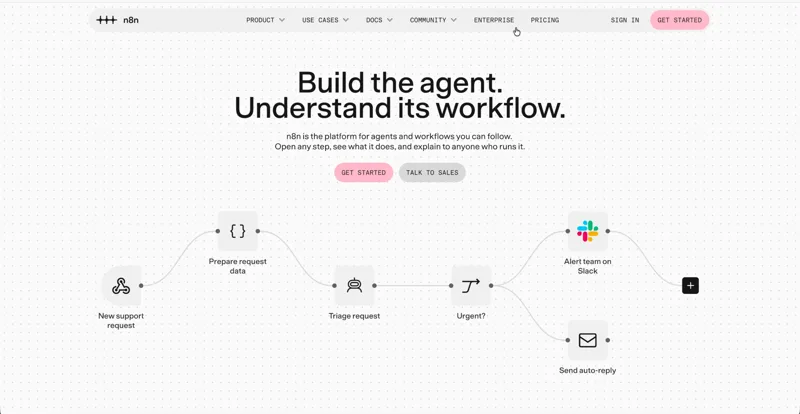
A diagnosis starts from the decision the team is about to spend money on. From the outside I have to infer it, and here the homepage states it: “Build the agent. Understand its workflow.” n8n is betting that agents are the next reason to choose it, and that its old strength, workflows you can open step by step, is what will set its agents apart. It charges per workflow execution, and its pricing page says it plainly: if it does not run, you do not pay. So the decision every quarter is the same: what gets more new accounts from a first idea to a workflow that runs in production. Everything below is ranked by what it does to that.
What the product shows
- A six-question survey before the product. Company size, role, where you heard of n8n, whether you already know what to automate (“Not yet” or “Yes”), which of JavaScript, SQL, API authentication, regex and webhooks you are comfortable with without AI, and which AI tools you use.
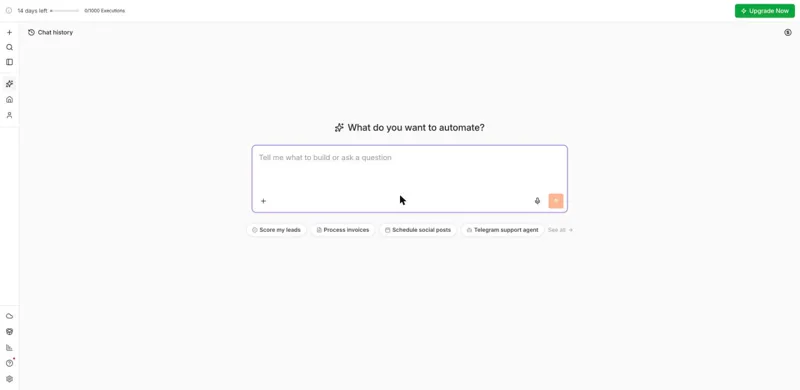
- The AI assistant as the first screen. “What do you want to automate?”, four suggestions (score my leads, process invoices, schedule social posts, a Telegram support agent), and a trial bar: 14 days left, 0 of 1,000 executions, Upgrade Now. I had answered “Not yet”; the screen did not mention it.
- A real workflow in 78 seconds. I asked for a contact form that is summarized by AI and sent to Telegram only when it is a sales lead. The assistant built a webhook, an AI step with structured output, a lead check and a Telegram step, then ran it on sample data.
- An honest report. It said the test was simulated, the AI step runs on n8n’s own credits so no API key is needed, the workflow is an unpublished draft, and three things are left: a Telegram bot token from @BotFather, a chat ID, and pointing the website form at the webhook. The build used 31 of the trial’s assistant credits.
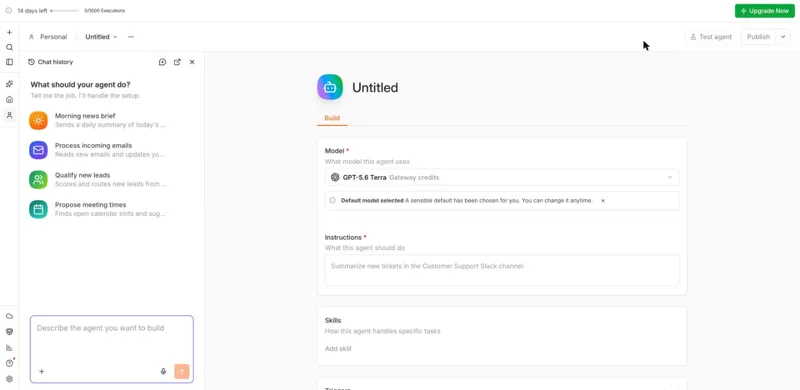
- Two ways to build an agent. Next to workflows sits Agents, in preview: a form with a model, instructions, skills and triggers, and its own chat with its own templates. It has no canvas.
- Pricing: Starter 20€ and Pro 50€ a month, billed annually, on n8n’s cloud, then Business at 667€ a month, self-hosted only, then Enterprise. All plans include unlimited users and workflows.
- What people report, by reactions on open issues: the top one is an AI agent that does not keep its tool calls in memory. Others near the top are model nodes breaking after updates, and tool errors that stop the whole workflow instead of going back to the agent.
Keep
The canvas as the output of AI. The assistant does not hide what it built. The workflow appears next to the chat, every step on the canvas, with the sample data that went through it. That is the homepage promise kept on the first try, and it is the thing an agent builder that only shows a chat cannot copy.
The honest report. “The test was simulated, nothing runs in production yet” is not what AI builders usually say; many stop at a success message. It tells a technical buyer the tool will not pretend, and it is a list of next steps at the same time.
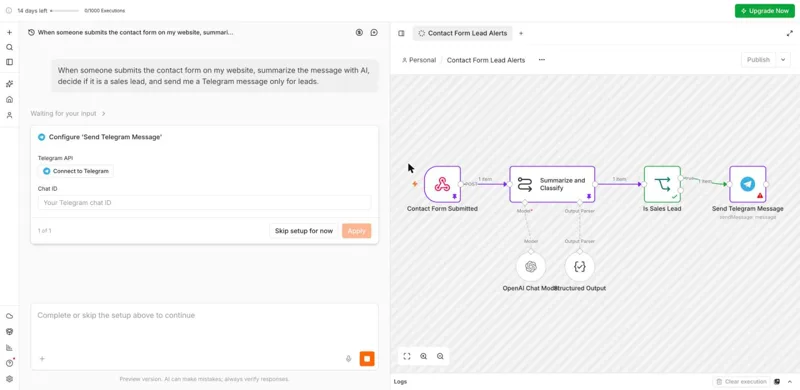
AI without an API key. The AI step runs on n8n’s credits from the first minute. The usual first wall in AI automation, a field asking for your own OpenAI key, is not there, and it should stay that way.
Charging per execution. n8n earns when a workflow runs, which is when the customer gets value. It keeps the company honest about what activation means, and it makes the next sections easy to rank.
Cut
Cuts are the weakest part of any outside view, because the reason to cut is usually in usage data. So this one comes with the check that would confirm it.
Survey questions whose answers change nothing. Six questions stand between sign-up and the product. I answered that I did not yet know what to automate, and the first screen was the same open prompt with the same four suggestions. Questions that only feed a sales or marketing segment cost every new account a little patience at its most fragile moment. Keep the ones that change the first screen; ask the rest later, or not at all. The check: compare the first screen across answers, and completion of the first workflow for people who answered “Not yet” against “Yes”. This is one run, so the first part needs confirming before anything moves.
Change
Design the last mile, not only the first draft. The assistant gets a person from an idea to a draft in about a minute. What is left is exactly what stops someone who answered “Not yet”: a bot token from another app, a chat ID they have never seen, and a webhook to connect to a site they may not control. Revenue starts only after those three. Today they arrive as a list at the end of a chat message. Make them a checklist attached to the workflow, each step with its own short guide, a button that sends one real test message, and a ready snippet for the website form. Then measure what n8n is paid for: the share of new trials that reach a first production execution, and how long it takes.
Make the overview count the first real run. A new account’s overview shows production executions 0, failure rate 0%, time saved “--”. Those numbers describe a running account. For a new one, the useful line is the distance to the first real run: drafts built, steps left, credentials missing.
Give the agent builder the canvas. The homepage promises that you can open any step and see what it does. The Agents preview is a form with no steps to open. The most upvoted open issue is about what an agent remembers from its tool calls, and the others near it are about agents failing in ways the person cannot see. That is the place where “understand its workflow” matters most. Show an agent’s run as steps, the same way a workflow run is shown, or build agents as workflows the way the assistant already does.
Show the step from Pro to Business before people hit it. Pro is 50€ a month on n8n’s cloud. The next plan is 667€ a month and self-hosted only. A small team that needs SSO, separate environments or Git version control has to change both its price and how it runs n8n at the same moment. Whether that cliff loses customers is a number only n8n has; from the outside it reads as a gap where a cloud plan for small teams could sit.
What a task audit adds
The sections above come from one walk through the trial and my notes. To check them screen by screen, I ran my UX audit agent on the same account with one task: take the draft the assistant built and get it running in production. The agent walks the task in a real browser and keeps only findings that a captured screen supports. The Telegram path stopped at the bot token, which only the account owner can create. So I asked the assistant to save leads to an n8n data table instead, published the workflow, sent it one test request and unpublished it. The agent captured 14 screens over 30 interactions and kept three findings.
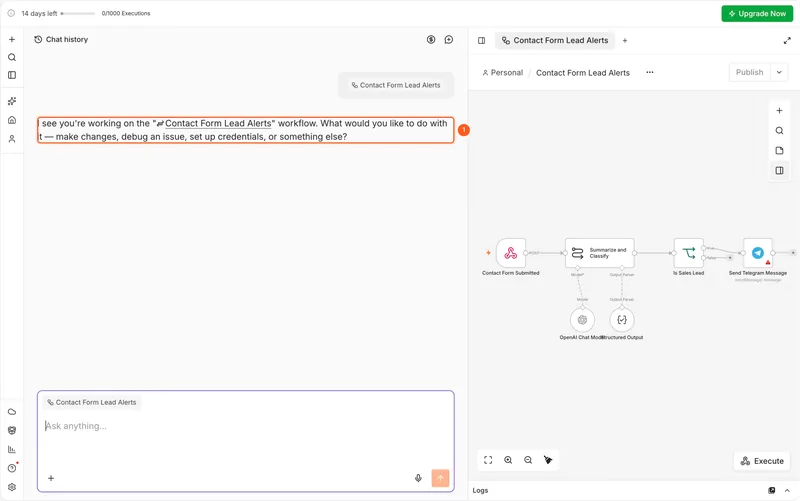
Coming back, the draft does not say what is left. The instance opens on the same empty prompt a new account sees. The Overview lists the draft by name and date, with no sign that it is unpublished. On the canvas, Publish is disabled, and its tooltip reads “1 node has issues, fix them before publishing.” without naming the node. The assistant on the canvas opens a new chat and asks what to do. The list of three remaining steps still exists, in Chat history, under a title the assistant gave it. This is the last mile from the Change section, measured: the product knows every step that is left and shows none of them where the work is.
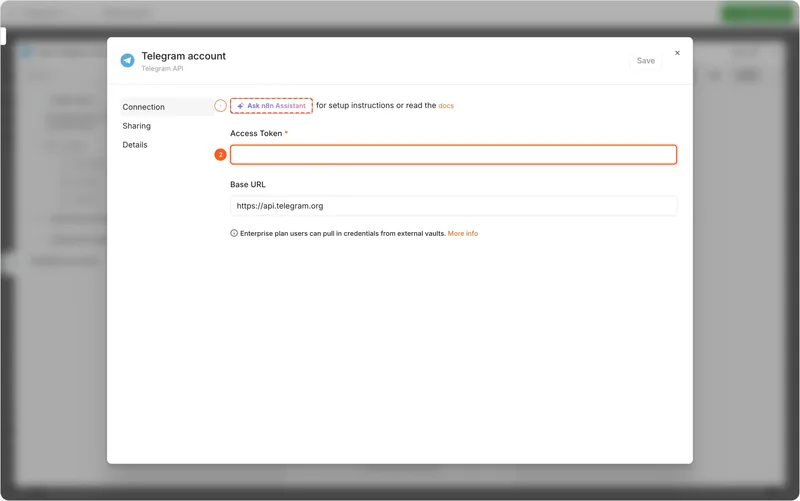
The token and the chat ID come from Telegram, and the fields do not say how. The credential dialog asks for an Access Token in an empty field with no description. Its only help is a button to ask the assistant and a link to the docs. The Chat ID field has the placeholder “Your Telegram chat ID” and nothing else. The token comes from @BotFather inside Telegram, and the chat ID from a message sent to the bot. Three lines of instructions under the field, and an offer to fill the chat ID from that message, would cover the step where the task blocked.
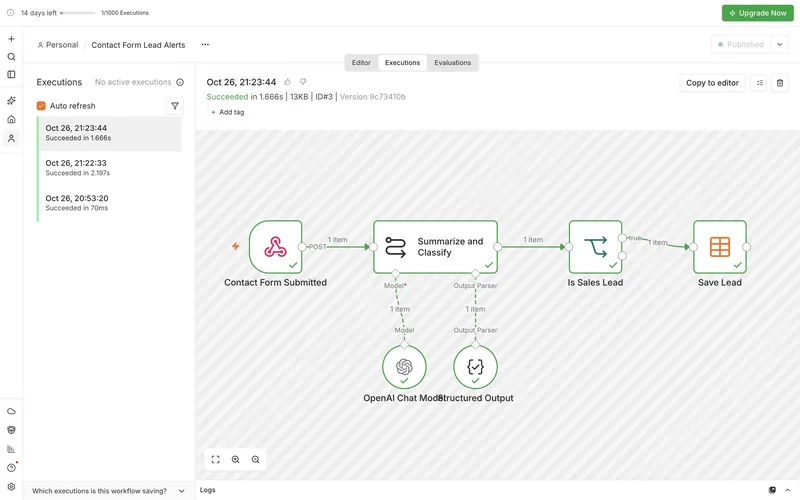
The rest of the route works, and the assistant stays honest. Before creating the table and before editing the workflow, the assistant asked for approval, each time with Allow once, Always allow and Deny. Its report said the save step was simulated and no row was written yet. After publishing, one request ran the whole workflow in under two seconds and saved the lead with the AI’s summary. The trial counter moved from 0 to 1 only then. The test runs before publishing did not count.
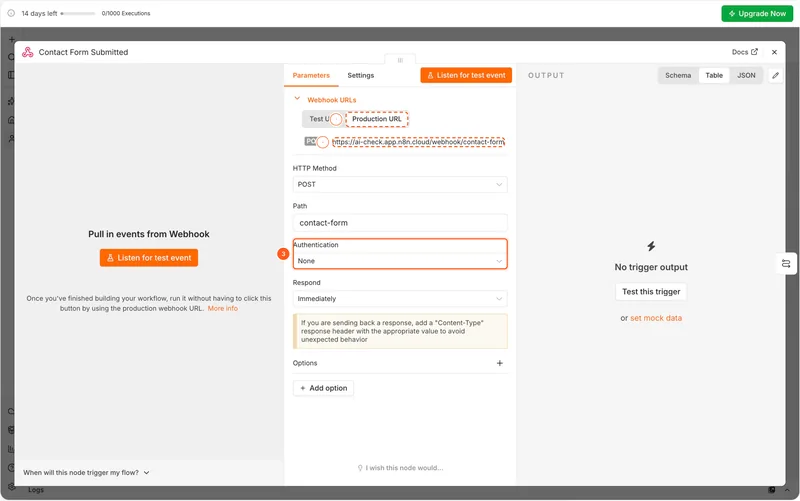
Only the assistant says the webhook is public. The assistant built the form trigger with Authentication set to None, a fair default for a contact form. Asked what is left before production, it listed the point itself: the webhook is unauthenticated, consider protection before it goes live. Publish then asks only for a version name. The confirmation says production calls can now be made and does not show the URL. The decision to open the URL is made in that dialog, so that is where the assistant’s line belongs. Whether spam would count against the trial’s 1,000 executions I did not test; the workflow was unpublished after one request.
The audit agrees with the outside view and makes the first Change concrete. The assistant already knows what is left and what is risky. The checklist should live on the workflow and name the step that blocks Publish. It should explain the two Telegram values where they are asked for, and bring the webhook question into Publish.
Next
In order, with what each step has to prove before the next one costs money:
- Measure the path from idea to first production run, split by where people started: the assistant, a blank canvas, a template or the Agents preview. If the assistant path reaches production more often, it earns the front door. If it produces drafts that never run, the last mile is the problem, not the AI.
- Pick one front door for building with AI. Today a new account can start in the assistant, on the canvas or in Agents, and the assistant and Agents each have their own chat and their own suggestions for the same jobs (scoring or qualifying leads appears in both). Keep the one that reaches production; make the others lead into it.
- Fix what breaks agents before adding to them. Memory of tool calls and tool errors that stop the workflow are the issues people vote for. Each is a case where a person cannot follow what the agent did, which is the promise on the homepage.
What a real diagnosis would need
Everything above is an outside view, and the gaps in it are the expensive part. With the team and one week, I would want:
- The share of new trials that reach a first production execution, by starting point and by survey answer.
- How many drafts the assistant builds per account before the first one is published, and what they cost in credits.
- Where people stop between draft and production: credentials, publishing, connecting the trigger.
- Agents versus workflows: how many of each are published and still running a month later.
- Accounts that leave Pro, and how many of them needed a Business feature.
- The roadmap, and the reasons behind its first three items.
Several of the recommendations above could reverse once those numbers are in. That is the point of doing this with the data: an outside view finds the right questions, and the week answers them.
How this differs from the real thing
A Product Diagnosis takes a week, starts from your data and your roadmap, and ends in one document with every point traced to the evidence behind it, the same structure as above. The UX audit agent covers one task in a product; a diagnosis covers the decisions behind the whole thing.
About to commit a quarter to a direction?
A Product Diagnosis tests it against your data and your roadmap in one week. From $900, fixed before we start.